GameSir Tarantula Pro controller review: A boon for multi-platform gamers

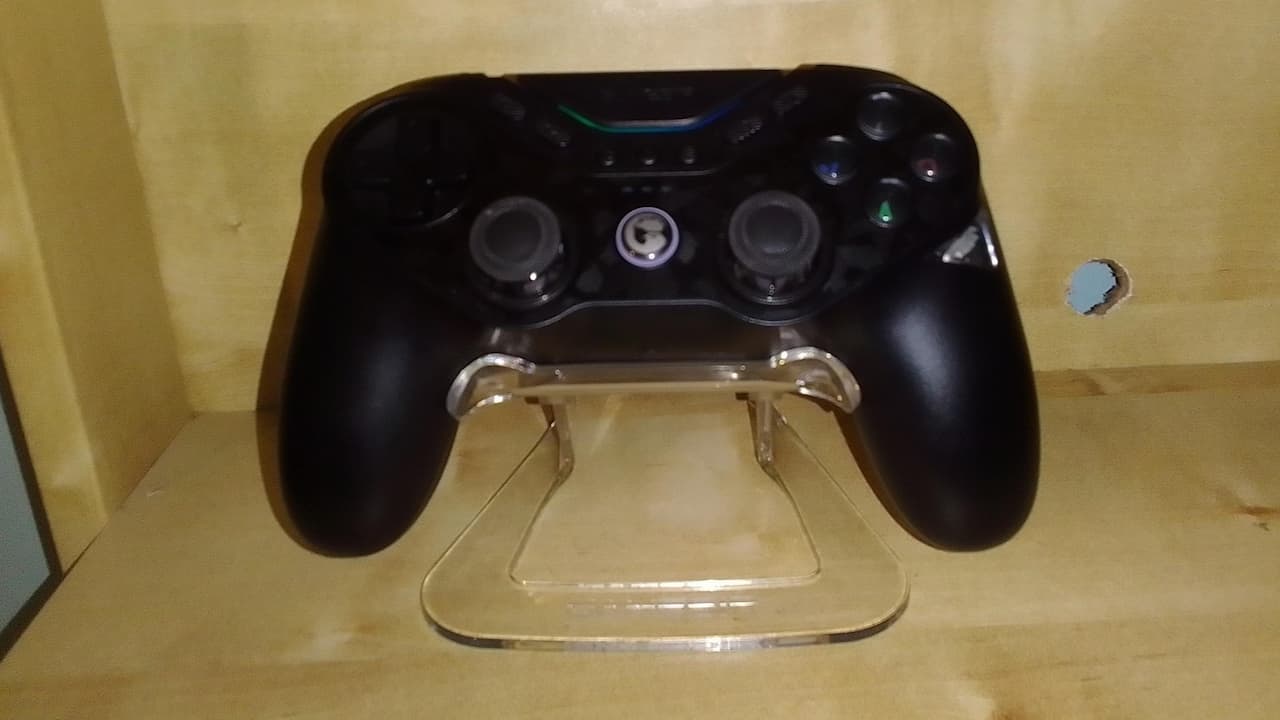
At first glance, GameSir’s Tarantula Pro reminds me of an off-brand PlayStation 2 controller, the ones that would have extra autofire buttons to compensate for not being Sony-approved. But there’s nothing cheap and cheerful about the Tarantula Pro, which even comes with its own charging stand. And its extra functionality is a boon if you game across mobile, Nintendo Switch and PC (with or without the included dongle).
The GameSir Tarantula Pro gets its name from its programmable face buttons which, in addition to two rear triggers, can be mapped to single or multiple button combinations. It took a couple of tries to map but, playing old-school Street Fighter 2, I was able to pull off Zangief’s Lariat with a single button press. The Tarantula Pro doesn’t seem to handle sequences, however, so mapping Ryu’s fireball was out.
Back in the modern age of gaming, the Tarantula Pro handled like a dream with every PC FPS I threw at it. The controller is comfortable to hold, and there’s a button each to flip the Hall Effect triggers from normal to hair-trigger mode. I won’t pretend to be a pro Call of Duty player, but I certainly felt like I had an edge, being able to fire off a shot with the lightest touch of my finger.
Another neat feature is that you don’t have to mess around remapping the face buttons for Nintendo Switch. Instead, the face buttons change from an Xbox to a Nintendo Switch configuration you’re playing on Switch, with a satisfying whirr. It felt like magic the first few times this happened. You can even see the tiny cog through a clear window, though my one worry is that it’s another moving part that could fail.
You can tweak virtually every aspect of the Tarantula Pro through the mobile app and, according to GameSir you can do the same on the PC using the GameSir Connect software. I can’t vouch for that last facility because, at the time of writing, the English language version of the app isn’t out. But having used multiple GameSir controllers on PC before, all having their own software, I don’t think it’s going to be a problem.
Related: The 7 Best (and 3 Worst) Game Console Controllers Ever
So how did the Tarantula Pro hold up to prolonged use? The controller itself never faltered, whether I was bounding around in Grapple Dog: Cosmic Canines or taking on the infected in Left 4 Dead. Granted, I could have used a mouse for the latter but I lean towards big-screen TV gaming. While the Tarantula Pro uses Hall Effect triggers, it has TMR sticks which are supposed to be a step above Hall sticks. They’re new enough that there’s no solid consensus but the pad remained responsive and, in theory, the sticks should last.
However, I can’t honestly say I made massive use of those programmable face buttons, as much as I appreciated the option. I mapped controls — weapon switch and the like to the buttons at the bottom of the controller, because I could reach those with the digits I wasn’t using. By contrast, to use the programmable face buttons, I’d have to lift my thumbs off the joysticks or buttons. I did appreciate the screenshot button, but the others, not so much.
If you’re a hardened esports player, say Apex Legends or Valorant, you’ll probably get more use out of the front buttons, as long as you’re not under fire at the time. But I always chose the lower mappable buttons because of the speed and ease by which I could access them.
At £55.00, the GameSir Tarantula Pro is a great quality PC controller and an excellent deal if you game between iOS/Android, Nintendo Switch and PC. You may not use every single feature, but the GameSir Tarantula Pro has enough bite to be worth a purchase.